

Auction Rules
How does the auction work?
Hajduk Split is a club of rich history and strong identity, and many items created throughout that story carry special value and significance. Through auctions on the Hajduk Web Shop, we aim to give our supporters and customers access to precisely such unique exhibits.
These are original and rare products that are not part of the regular offer and are otherwise almost impossible to obtain – items that bear the authentic mark of the Club, its players, and important moments from its history. The auction model ensures a transparent and fair way of participation, giving every interested buyer an equal opportunity to acquire a product of exceptional value.
In this way, Hajduk auctions become a place where history, exclusivity, and the opportunity to make a part of that story a part of your personal collection come together.
It is important to note that 15% of the proceeds from each auction are donated to the account of the Hajduk supporters’ humanitarian club Bilo srce, adding a humanitarian dimension to every auction.
1. Who can participate in the auction?
To participate, you must be logged in to your user account. Please note that some auctions will be available to all customers, while others will be exclusively available to Hajduk members. You cannot participate as a guest without logging in.
On the page of an ongoing auction, you will see the following key information:
- time remaining until the auction ends
- current price
- minimum amount for the next bid you can place
2. Placing a bid
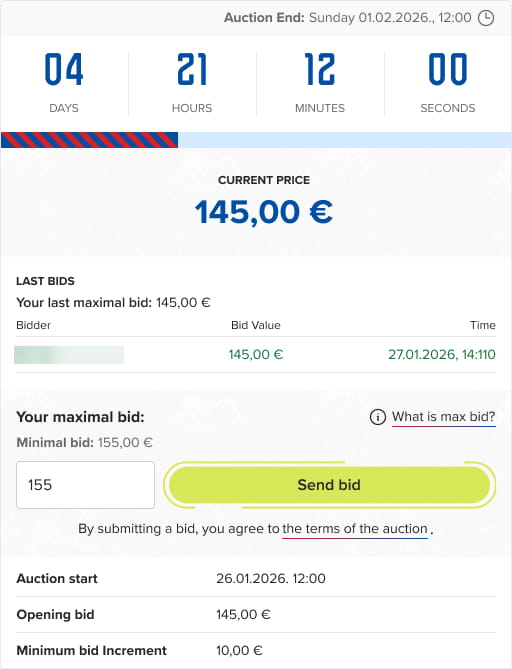
Enter the maximum amount you are willing to pay for the auction in the bid field. This is confidential and known only to you and the auction administrator. The amount must be:
- higher than the current price, and
- at least equal to the minimum bid increment.
Click the “Place Bid” button.
If your bid is valid:
- It is saved immediately.
- If it is higher than the maximum amount previously set by another user, your bid becomes the active bid.
- If it is lower than the maximum amount previously set by another user, the highest bid increases by the “Minimum bid Increment,” and the current highest bidder remains unchanged.
When your bid is the highest, if someone later places a bid higher than your maximum:
- Your bid remains recorded.
- The current price increases by the “Minimum bid Increment.”
- You have the chance to regain the lead by placing a higher bid.
If multiple users place the same maximum bid amount, priority is given to the user who placed that amount first.
3. Maximum bid
The maximum bid allows you to set in advance the highest amount you are willing to pay, and the system will automatically bid on your behalf. This is the maximum amount you are prepared to pay in this auction. The system will automatically place the minimum necessary bid to keep you in the lead, up to your limit. Your maximum bid will be known only to you and will not be visible to other bidders.
This option is ideal if you do not want to continuously monitor the progress of the auction.
3.1. What is a maximum bid?
A maximum bid is the highest amount you are willing to pay. The system does not immediately place this amount as your active bid.
Instead, it:
- Automatically increases your bid only when necessary
- Always in minimum bid increments
3.2. How does it work in practice (example)?
Let’s consider the following scenario in an ongoing auction:
- Current price: €100
- Minimum bid increment: €10
- Your maximum bid: €150
Auction flow:
- The system places you as the leading bidder with a bid of €110. Other visitors see only the current price - they do not know your maximum bid.
- If someone bids €120, the system automatically increases your bid to €130, which becomes the current price.
- If someone bids €150, you remain in the lead because your maximum bid has been reached but not exceeded. You have priority since you were the first to set this amount.
- If someone bids €160 or more, your maximum bid is exceeded, and you lose the lead.
The system will never place a bid higher than your maximum bid on your behalf.
3.3. What do other customers see?
Other users do not see your maximum bid.
Only the following are visible:
- Current price
- List and history of bidders
3.4. Can I change my maximum bid?
You may:
- Increase your maximum bid while the auction is ongoing
You may not:
- Decrease your maximum bid
- Withdraw a bid that has already been placed
If you believe a serious error has occurred, please contact us at webshop@hajduk.hr or call +385-91-HAJDUK.
4. Auction duration
During the auction, the system continuously processes all incoming bids and updates the auction status in real time.
- The auction lasts until a specific end time, which is clearly indicated on the product page.
- All bids placed before the end time are considered valid and included in the calculation.
- The current auction price is automatically updated after each valid bid.
- The system may automatically increase bids on behalf of users who have set a maximum bid, in accordance with the minimum bid increment rules.
- In the case of multiple bids placed in a short period, the system processes them in the order they are received.
The information displayed on the product page (current price, leading bidder, remaining time) is for informational purposes only, while the official auction status is the one recorded in the system.
5. Auction end
When the auction ends, the participant with the highest valid bid wins.
Auction Winner
- If your bid is the winning bid, the system will automatically notify you of the outcome.
After that, we will contact you using the details provided during registration and send you the payment instructions for your bid. - If proof of payment is not received within 48 hours of the notification, your bid will be considered invalid, and the winning bid will be awarded to the next highest bid listed in the bidding table.
Other participants have no obligations.
If no one exceeds your maximum bid:
- you win the auction at the current price
- you do not pay your entered maximum bid amount if it has not been reached through the previously explained bidding steps
6. My auctions (my account)
In your user account, you can view completed auctions in which you participated.
On the My Account / My Auctions page, the following are displayed:
- Auctions you have won
- Auctions you participated in but did not win
For each auction, the following information is shown:
- Basic product details
- Auction end time
- Your maximum bid
- Final price
On the same page, there is also a privacy setting: “Hide my full name in auction lists,” which allows you to control how your name is displayed. After changing this setting, you must click “Save” for the change to take effect.
7. Important Notes
Auctions are designed as a special way to take part in Hajduk’s story: through sporting competition, passion, and the sense of community shared by all the Club’s supporters. Please participate in auctions responsibly and only place bids for amounts you are willing and able to pay if you win.
Enjoy the competition, respect other participants, and let the auctions be another reason for pride and joy in being part of Hajduk.
- Once placed, a bid cannot be withdrawn or canceled.
- After the auction ends, no further bids can be placed.
- The system ensures fair and transparent competition and processes bids in the order they are received.
- In case of technical issues, the last correctly recorded bid in the system is considered valid.
- If you have any questions, please contact us.